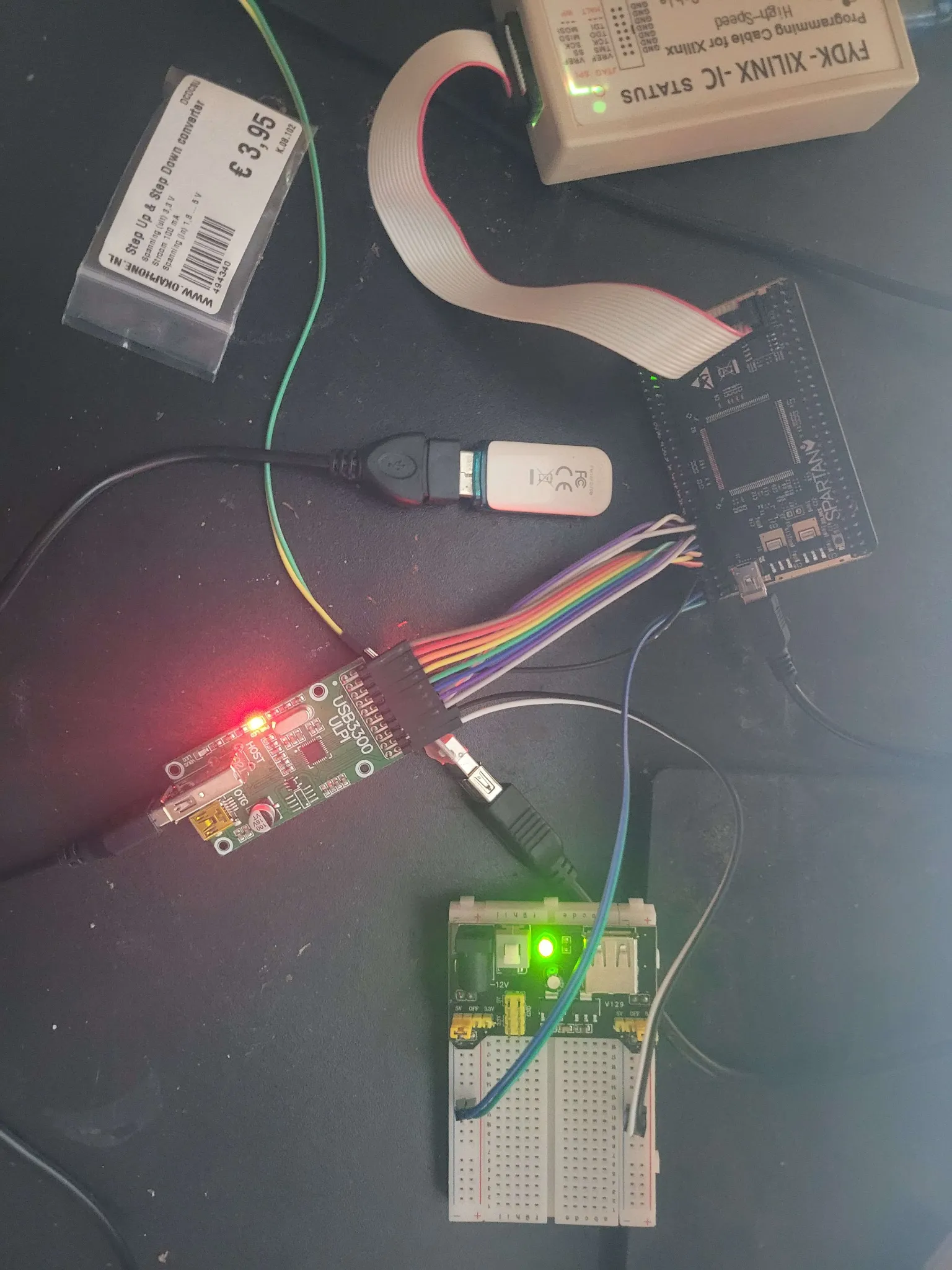
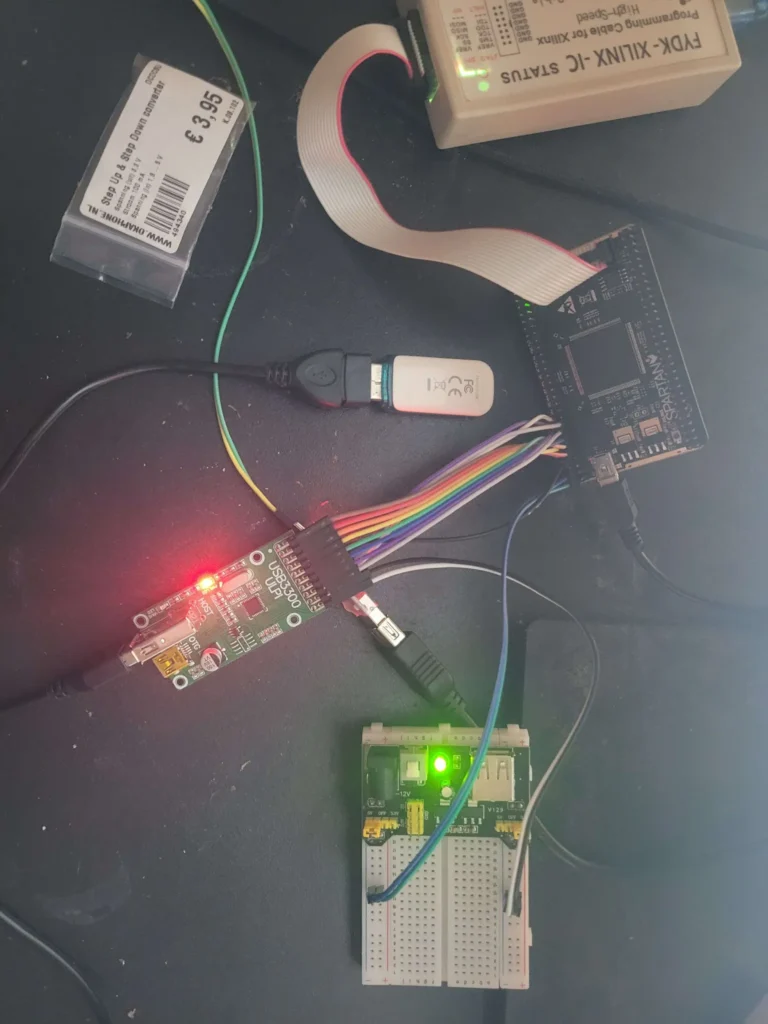
Our colleague Philip is trying to get a Spartan 6 FPGA talking to a USB3300 USB PHY. The hardware is a s602 board with a 6SLX9TQG144 FPGA from AliExpress and a USB3300 ULPI board from Waveshare.
On Philip’s Windows setup, running ISE in a VM means disabling WSL. So he runs ISE 14.7 in Docker and builds from PowerShell, keeping the old Xilinx tools in their own little box.
FPGAs
An FPGA (Field-Programmable Gate Array) is a chip with configurable logic, memory and connections. Verilog describes a digital circuit built from those resources. Different parts of the circuit can operate in parallel. This is one of the cool advantages over a CPU: each task can have its own dedicated hardware.
A register stores bits of data using flip-flops, which each hold one bit. Together they can hold a counter value or the current state of the circuit. The logic calculates new values from the inputs and stored values. A clock provides a repeating signal, and the registers accept their new values on a clock edge. In this design that is the rising edge, when the clock changes from 0 to 1.
The build tools produce a bitstream containing the configuration for the logic and its connections. Loading that file makes the FPGA implement the circuit.
Hardware connections
The FPGA contains the test logic, while the USB3300 handles the electrical side of USB. This is the PHY, or physical layer. It provides the USB transmitter and receiver that the FPGA’s general-purpose pins do not. ULPI is the digital connection between them, carrying bytes and control signals. The PHY also supplies its 60 MHz clock to the FPGA.
Programming uses a separate connection. The Digilent HS3 is a USB-to-JTAG programmer. JTAG provides access to the FPGA for loading a bitstream and, with the debug hardware described below, reading internal signals.

Setup
ISE is Xilinx’s software for building FPGA designs. The spartan 6 FPGA uses this older toolchain because Vivado supports devices from the 7 series onward.
Docked-ISE-147 packages ISE for command-line use in a Linux container.
git clone https://github.com/I-A-S/Docked-ISE-147.git

cd Docked-ISE-147
The image build needs the full Linux installer, Xilinx_ISE_DS_Lin_14.7_1015_1.tar, in the repository’s Resources directory:
docker build -t docked-ise-147 .Build
The test design checks that the FPGA can talk to the USB3300 by reading its vendor and product IDs from four ULPI registers. These are storage locations inside the PHY, accessed by address over ULPI. If the IDs match 0x0424 and 0x0004, the green LED stays on. If either value is wrong or the handshake times out, the LED blinks quickly.
Xilinx.lic and the build script are in the project root. The Verilog and matching UCF file are in src. The UCF maps signals in the design to physical FPGA pins and sets timing constraints, including the clock periods and the time allowed for signals going to and from the PHY.
build.ps1 copies the source files to build and runs ISE inside Docker:
$ErrorActionPreference = 'Stop'

$resolvedRoot = (Resolve-Path -LiteralPath $PSScriptRoot).Path
$buildDir = Join-Path $resolvedRoot 'build'
New-Item -ItemType Directory -Path $buildDir -Force | Out-Null
$resolvedBuild = (Resolve-Path -LiteralPath $buildDir).Path
if ((Split-Path -Parent $resolvedBuild) -ne $resolvedRoot -or (Split-Path -Leaf $resolvedBuild) -ne 'build') {
    throw "Refusing to clean unexpected build path: $resolvedBuild"
}
Get-ChildItem -LiteralPath $resolvedBuild -Force | Where-Object Name -notin @('litescope', 'passive') | Remove-Item -Recurse -Force
Copy-Item -LiteralPath (Join-Path $resolvedRoot 'src\ulpi_clock_test.v'), (Join-Path $resolvedRoot 'src\ulpi_clock_test.ucf') -Destination $buildDir -Force

$license = (Resolve-Path -LiteralPath (Join-Path $resolvedRoot 'Xilinx.lic') -ErrorAction Stop).Path
& docker run --rm `
    --mount "type=bind,source=$buildDir,target=/workspace" `
    --workdir /workspace `
    --mount "type=bind,source=$license,target=/opt/Xilinx/Xilinx.lic,readonly" `
    --env XILINXD_LICENSE_FILE=/opt/Xilinx/Xilinx.lic `
    docked-ise-147 `
    xflow -p xc6slx9-tqg144-2 `
    -synth xst_verilog.opt `
    -implement balanced.opt `
    -config bitgen.opt `
    ulpi_clock_test.v
if ($LASTEXITCODE -ne 0) {
    throw "ISE build failed with exit code $LASTEXITCODE"
}

$bitstream = Join-Path $buildDir 'ulpi_clock_test.bit'
if (-not (Test-Path -LiteralPath $bitstream -PathType Leaf)) {
    throw 'ISE finished without creating ulpi_clock_test.bit'
}

Write-Host "Built $bitstream".\build.ps1xflow runs synthesis, which turns the Verilog into logic and storage resources, followed by implementation, which places those resources on the FPGA and routes the connections between them. Bitstream generation writes the resulting configuration to build/ulpi_clock_test.bit. Since build is mounted from the host, the reports and bitstream remain after Docker removes the container.
Signals take time to travel through the logic and connections. A value must reach its destination before the clock edge that stores it and remain stable briefly afterwards. The timing report checks these requirements against the constraints. The clock constraints specify about 16.667 ns between rising edges for the 60 MHz ULPI clock, and 20 ns for the 50 MHz board clock used in the debug build.
Before programming, I check for timing violations and paths missing constraints. A successful build can still produce a bitstream with timing problems.
xflow runs synthesis, which turns the Verilog into logic and storage resources, followed by implementation, which places those resources on the FPGA and routes the connections between them. Bitstream generation writes the resulting configuration to build/ulpi_clock_test.bit. Since build is mounted from the host, the reports and bitstream remain after Docker removes the container.
Signals take time to travel through the logic and connections. A value must reach its destination before the clock edge that stores it and remain stable briefly afterwards. The timing report checks these requirements against the constraints. The clock constraints specify about 16.667 ns between rising edges for the 60 MHz ULPI clock, and 20 ns for the 50 MHz board clock used in the debug build.
Before programming, Philip checks for timing violations and paths missing constraints. A successful build can still produce a bitstream with timing problems.
Programming
OpenFPGALoader runs on the PC and sends the bitstream through the HS3 to the FPGA’s JTAG port. For a temporary test, it loads the configuration into the FPGA’s SRAM:
openFPGALoader -c digilent_hs3 .\build\ulpi_clock_test.bitThe SRAM configuration is lost when power is removed. flash.ps1 writes the bitstream to the board’s SPI flash instead. The FPGA loads that configuration when it powers on.
The flash is connected to the FPGA, so OpenFPGALoader first loads a small SPI-over-JTAG bridge into the FPGA. This temporary design passes commands from JTAG to the flash chip. The script downloads the bridge for this FPGA and sits in the project root alongside build.ps1:
$ErrorActionPreference = 'Stop'

$root = (Resolve-Path -LiteralPath $PSScriptRoot).Path
$bitstream = (Resolve-Path -LiteralPath (Join-Path $root 'build\ulpi_clock_test.bit') -ErrorAction Stop).Path
$bridgeDir = Join-Path $root '.tools\openFPGALoader'
$bridge = Join-Path $bridgeDir 'spiOverJtag_xc6slx9tqg144.bit.gz'
if (-not (Test-Path -LiteralPath $bridge -PathType Leaf)) {
    New-Item -ItemType Directory -Path $bridgeDir -Force | Out-Null
    $download = "$bridge.download"
    Write-Host 'Downloading Spartan-6 SPI-over-JTAG bridge...'
    Invoke-WebRequest -UseBasicParsing -Uri 'https://raw.githubusercontent.com/trabucayre/openFPGALoader/v1.1.1/spiOverJtag/spiOverJtag_xc6slx9tqg144.bit.gz' -OutFile $download
    Move-Item -LiteralPath $download -Destination $bridge -Force
}

$bridge = (Resolve-Path -LiteralPath $bridge -ErrorAction Stop).Path
$cygpath = (Resolve-Path -LiteralPath 'C:\Program Files\Git\usr\bin\cygpath.exe' -ErrorAction Stop).Path
$loader = (Get-Command openFPGALoader.exe -ErrorAction Stop).Source

$env:Path = "$(Split-Path -Parent $cygpath);$env:Path"
$env:OPENFPGALOADER_SOJ_DIR = & $cygpath -u (Split-Path -Parent $bridge)

& $loader -c digilent_hs3 --fpga-part xc6slx9tqg144 -f $bitstream
if ($LASTEXITCODE -ne 0) {
    throw "Flash failed with exit code $LASTEXITCODE"
}

Write-Host "Flashed $bitstream"
.\flash.ps1
On Windows, the script adds Git for Windows’ usr/bin directory to PATH so OpenFPGALoader can find its runtime DLLs. OpenFPGALoader documents both loading modes here.
Debugging
A blinking LED can give you a pass or fail result, but when you want to see what’s happening inside the FPGA, LiteScope gives you a logic analyzer built into the design. It records selected signals into the FPGA’s internal memory. The capture can then be downloaded as a VCD waveform or a CSV file.
The debug setup
Migen and LiteX put the debug hardware around the existing Verilog design. Migen generates Verilog from Python, while LiteX provides the control registers and connections between the hardware blocks. SoCMini supplies a small LiteX system without a CPU or firmware.
JTAGBone gives the PC access to those control registers through the same HS3 programmer. On Windows, OpenOCD handles the programmer, and a Python bridge connects it to a LiteX server on localhost:1234:
& .\.venv-litescope\Scripts\python.exe .\litescope\litex_jtag_server_windows.py `
    --config .\litescope\openocd-hs3-spartan6.cfg `
    --openocd (Get-Command openocd.exe).Source
For this example, the debug bitstream contains a separate USB attach/reset test. LiteScope records the test’s state, error code and ULPI signals at 60 MHz. Its 1024-sample buffer holds about 17 microseconds of activity.
Capturing a failed command
An error code of 1 means the FPGA timed out waiting for the PHY to accept a register command. The capture below waits for that error and saves the signals around it. The condition that selects this moment is called the trigger.
This capture.py example starts with a freshly loaded debug bitstream in SRAM and the LiteX server running. The test waits for a start command from the PC. The two CSV files come from the debug build: csr.csv contains the register addresses, and analyzer.csv describes the recorded signals.
from pathlib import Path
import time

from litex.tools.litex_client import RemoteClient
from litescope.software.driver.analyzer import LiteScopeAnalyzerDriver

build = Path(__file__).resolve().parent / "build" / "attach-reset-litescope"
bus = RemoteClient(csr_csv=str(build / "csr.csv"))
bus.open()
try:
    analyzer = LiteScopeAnalyzerDriver(
        bus.regs, "analyzer", config_csv=str(build / "analyzer.csv")
    )
    analyzer.configure_group(0)
    analyzer.configure_subsampler(1)
    analyzer.add_trigger(cond={"main_debug_error_code": "1"})
    analyzer.run(offset=512, length=1024)

    # The analyzer is ready before the test starts.
    bus.regs.main_attach_reset_start.write(1)

    deadline = time.monotonic() + 20
    while not analyzer.done():
        if time.monotonic() >= deadline:
            raise TimeoutError("Trigger not seen within 20 seconds")
        time.sleep(0.05)

    analyzer.upload()
    analyzer.save(str(build / "command-timeout.vcd"))
    analyzer.save(str(build / "command-timeout.csv"))
finally:
    bus.close()
With capture.py in the project root, the command in a second terminal is:
& .\.venv-litescope\Scripts\python.exe .\capture.pyoffset=512 keeps half the samples from before the trigger. This is useful since the command timeout takes roughly 280 ms, far longer than the capture buffer. Triggering on the error keeps the end of that wait and the failure in view. If the error never occurs, the script stops after 20 seconds. Another test run needs a fresh SRAM load.
The diagram shows what that failure could look like. ulpi_nxt stays at 0, so the FPGA is still waiting for the PHY to acknowledge the command. The state then changes from ST_WAIT_COMMAND to ST_FAIL, and the error code becomes 1. That narrows the next checks to the ULPI connection and its timing.

Agent skills
For anyone who wants to use this setup in their own projects, Philip has collected the build, flash and debugging workflows in a set of FPGA skills.
This study was conducted and written by Philip Woldhek:

Philip Woldhek
Site Reliability Engineer